Square Payroll Specs, Features, and Value: Is it worth the price tag?
Category: Electronics
Introduction
Square Payroll targets small and micro businesses with straightforward payroll needs, especially those already using Square’s point-of-sale and time-tracking tools. The service promises automated payroll runs, tax calculations and filings, contractor payouts, and integrations that aim to reduce administrative overhead for retail shops, cafes, restaurants, and small service businesses. This article examines Square Payroll’s specifications and capabilities, highlights real-world use cases, weighs pros and cons, and helps readers decide whether the platform's cost aligns with the value it delivers.
Product overview and core specifications
At its core, Square Payroll is a cloud-based payroll service that handles recurring pay runs, tax calculations, filings, and employee and contractor payments. Key specifications and service characteristics include:
- Payroll types supported: W-2 employees (with full payroll tax calculation and filing) and 1099 contractors (contractor-only plan).
- Payroll frequency: Flexible—weekly, biweekly, semimonthly, monthly, and off-cycle payrolls; same-day processing options are typically available for an additional fee.
- Tax handling: Automated federal, state, and local tax calculation and filing where Square supports the state; year-end forms (W-2s and 1099s) are generated.
- Payments: Direct deposit to employees and contractors; physical checks can be offered in some cases via partners.
- Integrations: Native integration with Square Point of Sale, Square Timecards, and other Square products; API and partner integrations for benefits and time tracking in some markets.
- Multi-state payroll: Supported, though additional setup steps and state registrations may be required for each payroll state.
- Reporting and compliance: Built-in payroll reports, payroll tax reports, and exportable data for accounting; compliance support for payroll tax filings.
- User access: Employer dashboard (web and mobile), employee access for pay stubs and tax documents via Square accounts.
Detailed feature analysis
Payroll processing and tax compliance
Square Payroll automates the repetitive parts of payroll: calculating gross pay, withholding taxes, remitting payroll taxes, and filing payroll tax returns. For businesses without in‑house payroll expertise, this automation reduces compliance risk and time spent on administrative tasks. Real-world users value the hands-off nature—once employees and tax details are configured, many payroll cycles require only review and approval.
That said, companies operating in multiple states should expect some onboarding work. Registering with state tax agencies, setting up unemployment insurance accounts, and ensuring local tax compliance can require additional steps and, in some cases, fees or third-party assistance.
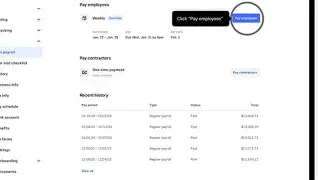
Contractor payments and 1099 management
Small businesses that work extensively with 1099 contractors will find Square’s contractor plan useful. The service supports contractor-only payroll, automatically generates 1099 forms, and provides contractor payment rails. This is particularly relevant for gig-oriented businesses, landscaping companies, event staff coordinators, and other service providers that mix W-2 employees and 1099 contractors.
POS and timecard integration
One of Square Payroll’s most practical advantages is its native integration with Square Point of Sale and Square Timecards. For retailers, cafes, and restaurants using Square to accept payments and track employee hours, payroll becomes a near-seamless extension of the existing data flow. Shift hours logged in Timecards can be imported into pay runs, reducing manual timesheet entry and errors.
In practice, this integration is a time-saver: managers who already rely on Square for sales and shift management appreciate being able to consolidate vendor relationships and dashboards into a single ecosystem.
Employee self-service and mobile access
Employees can view pay stubs, tax documents, and PTO balances through the Square mobile app or web portal. For businesses with hourly retail workers, mobile access for pay information reduces HR questions and paper handling. The self-service features are intentionally simple rather than comprehensive HR portals, which suits small teams but may leave larger employers wanting more advanced onboarding and document management tools.
Benefits, retirement, and workers’ comp
Square Payroll can connect with benefits and retirement partners in many regions, enabling employers to offer 401(k) plans or health benefits through third-party providers. Workers’ compensation management is commonly available as an add-on or through a partner integration. These options let small employers provide competitive benefits without managing multiple vendors, albeit with some administrative overhead when setting up plans or syncing deductions.
Looking for the best Electronics deals on Amazon?
Shop Amazon →Reporting and exports
Built-in payroll reports cover payroll summaries, tax liabilities, and historical pay runs. Export formats (CSV/Excel) make it possible to reconcile payroll in accounting packages or share data with bookkeepers. Buyers who prioritize accurate bookkeeping and audit trails will find these capabilities essential.
Real-world use cases
- Independent café or small chain of coffee shops: Uses Square POS and Timecards to track hours; Square Payroll automates weekly pay runs and tax filings, saving owners several hours per payroll cycle.
- Food truck operators: Benefit from mobile payroll approvals and contractor payments for occasional DJs or caterers.
- Small retail boutique: Prefers consolidated vendor ecosystem—payments, payroll, and reporting in one place—reducing reconciliation effort between systems.
- Contractor-heavy operations (landscaping, events): Use contractor-only plan to pay irregular vendors and generate 1099s at year-end.
- Businesses expanding to another state: Can run multi-state payroll but should budget time for state registration and potential extra fees.
Pros & cons
Key advantages
- Simple integration with Square POS and Timecards: Reduces duplicate entry and streamlines payroll for merchants already in the Square ecosystem.
- Automated tax calculations and filings: Less manual compliance work and fewer surprises at tax time for typical small business payrolls.
- Contractor-friendly option: Contractor-only plans and 1099 generation are convenient for gig and contract-heavy operations.
- Mobile-friendly employee access: Employees can access pay stubs and tax forms via mobile, which is ideal for hourly staff.
- Transparent, per-employee pricing model: Predictable costs for small headcounts (though per-employee fees can accumulate).
Main drawbacks
- Not a full HR suite: Lacks some advanced HR and onboarding features available from dedicated HR platforms or larger payroll providers.
- Potential additional fees: Add-ons like same‑day direct deposit, multi-state registration assistance, and some benefit integrations may increase total cost.
- Better for Square users: Businesses not using Square POS may not gain the same efficiency and could find alternatives more feature-rich for similar prices.
- Support limitations: Smaller providers sometimes have limited live support windows compared with enterprise payroll providers.
How Square Payroll compares (feature snapshot)
The following table compares Square Payroll against two commonly considered alternatives for small businesses: Gusto and ADP. The comparison focuses on the aspects buyers most often evaluate.
| Aspect | Square Payroll | Gusto | ADP |
|---|---|---|---|
| Best for | Small retail/food merchants using Square POS and Timecards | Small to medium businesses wanting a full HR + payroll stack | Businesses of all sizes seeking enterprise payroll and compliance |
| Pricing model | Monthly base + per-employee pricing; contractor-only plan available | Monthly subscription tiers with per-employee fees | Custom pricing, often higher; modular features |
| Tax filing | Automated federal/state/local filing for supported states | Automated filings and tax payments | Comprehensive tax and compliance services for many jurisdictions |
| Contractor support | Contractor-only plan and 1099 generation | Strong contractor support and 1099s | Robust contractor and multi-worker options (higher cost) |
| POS/timecard integration | Native Square integration (major advantage for Square users) | Integrations available with third-party time-tracking systems | Multiple integrations and enterprise time solutions |
| HR features | Basic (PTO, pay stubs, documents) | Comprehensive HR tools (onboarding, benefits, directories) | Extensive HR and compliance features (suitable for larger orgs) |
| Scalability | Excellent for small teams; less suited for complex enterprise needs | Good for growing companies up to mid-market | Built for scalability to enterprise levels |
Buying guide: what to consider before choosing Square Payroll
Businesses should evaluate the following factors to determine whether Square Payroll fits their needs and budget.
1. Existing software and vendor consolidation
If the business already uses Square for payments and shift tracking, Square Payroll often yields efficiencies that justify the cost. Consolidating invoices, point-of-sale, timecards, and payroll under one vendor simplifies reconciliation and support. Conversely, companies using a different POS or an elaborate HR stack should verify integrations and data flows before committing.
2. Headcount and pricing sensitivity
Square’s per-employee pricing is predictable for small teams, but buyers should model the monthly cost as headcount grows. For businesses with many part-time workers or large seasonal swings, the per-employee fee can add up quickly—budget projections should include peak-season payroll costs.
3. Multi-state operations and compliance needs
Multi-state payroll introduces additional registration steps and compliance complexity. Businesses expanding to new states should ask Square (or any provider) about support for state tax registration, associated fees, and how the provider manages varying local regulations.
4. Benefits and retirement offerings
If offering retirement plans, health insurance, or workers’ comp is a priority, confirm which partners and integrations are available and whether deduction management is automatic. Some employers prefer a provider that handles benefits enrollment and payroll-side deductions seamlessly.
5. Payroll frequency and cash flow
Check whether same‑day or expedited direct deposit is necessary and what fees apply. For small businesses managing tight cash flow, the timing and cost of payroll funding and direct deposits can influence the overall value.
6. Level of HR functionality required
Square Payroll suits businesses that need reliable payroll and basic HR features. If more advanced HR functions (performance management, complex PTO policies, applicant tracking) are required, consider a partner or a provider with a broader HR suite.
Shop the latest Electronics picks on Amazon.
Shop Amazon →7. Support and service expectations
Understand support channels and hours of operation. Small businesses without a dedicated bookkeeper rely on responsive support when tax or payroll issues arise; the response time and expertise of the provider’s support team can materially affect the user experience.
Cost vs. value: is Square Payroll worth the price?
Determining whether Square Payroll is "worth it" depends on a business's priorities. For the typical merchant that primarily cares about simplicity, integration with Square POS and Timecards, and strong contractor support, the platform often delivers clear value. Time saved on data entry, fewer payroll errors, and the convenience of automated tax filings translate to measurable administrative savings.
For businesses that need advanced HR capabilities, deep customization, or enterprise-level compliance across many states, the built-in simplicity of Square Payroll may prove insufficient. In those cases, the higher price of a more feature-rich provider could be justified by better long-term fit and fewer workarounds.
In practice, small retailers, restaurants, and service businesses that prioritize operational simplicity and already use Square for transactions will frequently find the subscription a sensible investment. Conversely, firms with complex HR workflows, large headcounts, or specialized compliance requirements may want to compare total costs, feature sets, and integrations before choosing Square.
Final considerations and recommendations
When evaluating Square Payroll, buyers should:
- Run a cost projection for at least 12 months, including peak-season headcount.
- Test the demo or trial to confirm how payroll integrates with point-of-sale and timecards.
- Verify multi-state support and any additional onboarding or registration fees if expansion is planned.
- Confirm what same-day or expedited payroll services cost if rapid pay runs are needed.
- Assess support availability and read real-world user reviews about responsiveness and issue resolution.
Conclusion
Square Payroll is a well-suited payroll solution for small businesses, particularly merchants already embedded in Square’s ecosystem who need reliable payroll processing, contractor payments, and straightforward tax filings. Its biggest strengths are simplicity, native integrations with Square POS and Timecards, and a pricing model that is predictable for small headcounts.
However, the same simplicity that makes Square Payroll attractive to small merchants limits its appeal for businesses that require deep HR functionality, extensive customization, or enterprise-grade scaling across many jurisdictions. Such businesses should compare alternatives that prioritize HR workflows and multi-state compliance. For many small brick-and-mortar businesses, though, the time savings and reduced compliance burden make Square Payroll a product that can be worth the price tag when evaluated against real operational needs.